Shareable Discount Links: The Complete Email & SMS Strategy Guide
Shareable discount links reduce friction but increase leakage. Learn how to create Shopify discount URLs, the hidden problems with this approach, and why UTM-based unique code triggering is the smarter alternative.

Muhammed Tüfekyapan
Key Takeaways
- 1 Shareable discount links reduce friction from 4+ steps to 1 click—improving email CTR by 15-30%
- 2 The link IS the code: shared links mean uncontrolled discounts leaking to coupon sites
- 3 Without redirect parameter, all discount URLs dump customers on homepage—breaking context
- 4 If code uses exceed emails sent, you have a leakage problem losing margin on every extra use
- 5 UTM-based triggering gives zero friction AND full control: unique codes, intent timing, real urgency
- 6 Track usage vs. sent ratio—above 100% means your discount links are spreading beyond your list
You send a discount code in your email. Your customer reads it, likes it, then... forgets it. They visit your store but can't remember the code. They abandon their cart. Sound familiar? Shareable discount links solve this problem. Instead of asking customers to remember and type codes, you give them a link that applies the discount automatically.
A Shopify discount URL looks like this: yourstore.com/discount/SAVE20. When customers click it, the code applies to their cart instantly. No typing. No errors. Just one click. But here's what most merchants don't know: shareable discount links create new problems while solving old ones.
In this guide, we'll show you how to create email discount links, the hidden problems with this approach, and a smarter alternative that gives you zero friction AND full control.
The Problem with Copy-Paste:
When you include a discount code in an email, customers must remember it, find the discount field, type it correctly, and hope it works. Each step loses conversions. Shareable discount links solve the first problem—but create new ones we'll explore below.
What Are Shareable Discount Links?
A shareable discount link is a URL that automatically applies a discount code when someone clicks it. Instead of saying "Use code SAVE20 at checkout," you say "Click here to get 20% off." The code applies without the customer doing anything.
The Shopify Discount URL Format
In Shopify, the Shopify discount URL format is simple: yourstore.com/discount/CODE. When customers click this link, Shopify adds the code to their cart automatically. They land on your store with the discount already applied.
Other Names for Discount Links
You might hear shareable discount links called different things: discount URLs, click-to-apply discount links, automatic discount URLs, or coupon links. They all mean the same thing—a link that applies a code when clicked.
| Method | Customer Action | Friction Level | Best Use Case |
|---|---|---|---|
| Code in email text | Copy, paste, hope | ❌ High | Any campaign |
| Shareable discount link | Click once | ⚠️ Low | Email, SMS, ads |
| Auto-apply on behavior | None | ✅ Zero | Advanced targeting |
Key Insight:
Shareable discount links reduce friction from 4+ steps to 1 click. But "1 click" still isn't zero—and the landing experience matters more than you think.
How to Create Shareable Discount Links in Shopify
Creating a Shopify discount URL is straightforward. Follow these steps to build your own email discount links in minutes.
Step-by-Step Guide
- Step 1: Go to Shopify Admin → Discounts → Create discount
- Step 2: Set up your discount code (e.g., SAVE20)
- Step 3: Build the URL: yourstore.com/discount/SAVE20
- Step 4: (Optional) Add redirect: yourstore.com/discount/SAVE20?redirect=/collections/sale
- Step 5: Test the link before sending to customers
URL Format Options
The basic format is mystore.com/discount/CODE. But you can add a redirect parameter to control where customers land after the code applies.
| URL Format | What Happens | Best For |
|---|---|---|
| /discount/CODE | Applies code, lands on homepage | General promotions |
| /discount/CODE?redirect=/collections/sale | Applies code, lands on collection | Targeted campaigns |
| /discount/CODE?redirect=/products/item | Applies code, lands on product | Product-specific offers |
Common Mistakes to Avoid
- Case sensitivity: SAVE20 and save20 might be different codes
- Expired codes: Test links before every campaign
- Usage limits: If the limit is reached, the link stops working
- No redirect: Customers land on homepage and get confused
Pro Tip:
Always use the redirect parameter with your Shopify discount URL. Without it, customers land on your homepage and lose the context of why they clicked. This kills conversions.
The Benefits of Shareable Discount Links
Email discount links offer real advantages over traditional "use code X" approaches. Here's why they work better for email and SMS discount codes.
Less Friction = More Redemptions
When you remove steps, more people complete the action. Click-to-apply discount links remove the copy-paste step entirely. Customers click once, and the discount is in their cart.
Higher Email CTR
"Click to apply your discount" is more compelling than "Use code SAVE20 at checkout." Shareable discount links turn your CTA button into a direct action, not a reminder.
9 Best Shopify Discount Apps: Find the Right One for YOUR Problem
Stop browsing feature lists. 9 premium apps compared by the 7 problems they solve—not rankings, not reviews, just honest "use this when..." guidance. Find your perfect match in minutes.
Mobile-Friendly
Typing discount codes on mobile is painful. Small keyboards, autocorrect errors, case sensitivity issues. Automatic discount URLs eliminate all of this—just tap and go.
| Metric | Code in Email | Shareable Link | Improvement |
|---|---|---|---|
| Email CTR | Baseline | +15-30% | ✅ Links are more clickable |
| Code redemption | Baseline | +25-40% | ✅ Easier to use |
| Mobile conversion | Baseline | +20-35% | ✅ No typing required |
| Support tickets | Higher | Lower | ✅ Fewer "code not working" |
Key Insight:
Shareable discount links solve the friction problem. But they don't solve the leakage problem, the personalization problem, or the timing problem. That's where most merchants stop thinking—and where smart merchants start.
The Hidden Problems with Shareable Discount Links
Shareable discount links look great on paper. But they come with serious problems that most guides don't mention. Here's what you need to know about your discount link strategy.
Problem 1: Forced Homepage Landing
Without a redirect parameter, every Shopify discount URL dumps customers on your homepage. Your email said "20% off jackets"—but they land on a homepage full of everything. Context lost. Customer confused.
Problem 2: Code Leakage
The feature that makes links "shareable" is also the problem. Customer forwards to friend. Friend posts on Reddit. Reddit user adds to coupon site. Your VIP-only discount now has 10,000 uses.
Problem 3: No Personalization
Everyone gets the same code, same discount, same experience. Your loyal VIP customer gets the same 10% as a first-time visitor. There's no way to differentiate.
Problem 4: Immediate Application
The code applies the moment someone clicks. Even if they were going to buy at full price. You've just discounted a customer who didn't need a discount—this is money lost.
Problem 5: No Urgency Element
Static links create no urgency. "I'll use this later," customers think. Later never comes. Without a countdown or real expiration, procrastination wins.
Problem 6: Attribution Loss
Which email subject line drove this sale? Which segment converts better? With shared links, attribution gets murky fast.
| Problem | Impact | Real Example |
|---|---|---|
| Homepage landing | Lost context, lower conversion | Email says "shoes," they land on homepage |
| Code leakage | Margin erosion | Link on Reddit = 500 unexpected uses |
| No personalization | Over-discounting | VIP gets same as first-time visitor |
| Immediate application | Discount to ready buyers | Would buy anyway, still gets 20% off |
| No urgency | Procrastination | "I'll use this later" = never |
| Attribution loss | Can't optimize | "Unknown" source on conversions |
Warning:
When you share a shareable discount link publicly, you're sharing the discount with everyone who sees it. The link IS the code. Once it's out there, you've lost control over who uses it and how many times.
Unique & Single-Use Codes: Stop the Leakage
Your SAVE20 code has 3,000 uses—you created it for 1,000 customers. Static codes leak everywhere. Learn why unique, single-use, auto-expiring codes are the only professional way to discount.
The Homepage Problem (Deep Dive)
Let's dig deeper into the landing page problem with shareable discount links. This is where most email campaigns lose their effectiveness.
The Default Behavior
When you use a basic Shopify discount URL like yourstore.com/discount/SAVE20, customers land on your homepage. Not the product they were interested in. Not the collection you mentioned. Just... your homepage.
The Broken Customer Journey
Your email says "20% off this amazing jacket!" The customer gets excited. They click. They land on... your homepage. Where's the jacket? They browse around. Maybe find it. Maybe don't. Many just leave.
| Email Content | Link Destination | Customer Experience |
|---|---|---|
| "20% off jackets" | Homepage | ❌ Confused—where are jackets? |
| "20% off jackets" | /collections/jackets | ⚠️ Better—sees jackets |
| "20% off THIS jacket" | /products/jacket | ✅ Perfect—sees exact item |
| "Your special offer" | Homepage | ❌ Lost—what was the offer? |
The Journey Problem:
Email marketing works because you can personalize the message. Shareable discount links break personalization by dumping everyone on the same page. You've won the click—then lost the customer.
The Code Leakage Problem (Deep Dive)
Here's the uncomfortable truth about shareable discount links: the feature that makes them "shareable" is exactly what makes them dangerous.
How Leakage Happens
You send a VIP email to 500 customers with a Shopify discount URL. One customer forwards to a friend. That friend posts in a Facebook group. Someone screenshots it. It ends up on a coupon site. Now 10,000 people have your "VIP" discount.
The Link IS the Code
With traditional codes, sharing requires effort—you have to type the code, remember it, share it. With email discount links, sharing is frictionless. Copy link. Paste. Done. The same feature that helps customers use the discount helps them share it.
| Scenario | Intended Uses | Actual Uses | Margin Impact |
|---|---|---|---|
| VIP email campaign | 500 | 500 | ✅ Controlled |
| Shareable link campaign | 500 | 2,500 | ⚠️ 5x over-discount |
| Link on coupon site | 500 | 10,000+ | ❌ Disaster |
Key Insight:
The same feature that makes shareable discount links "shareable" makes them uncontrollable. When you optimize for sharing, you optimize for leakage. Every shared link is margin walking out the door.
Email & SMS Best Practices for Discount Links
If you're going to use shareable discount links, do it right. Here are best practices for email discount links and SMS discount codes.
Email Best Practices
- Always use redirect: Don't dump customers on homepage
- Button CTA: "Claim My Discount" beats text links
- Set limits: Usage limits and expiration dates
- Segment codes: Different codes for different segments
- Add UTMs: Track which campaigns convert
SMS Best Practices
SMS has character limits. A full Shopify discount URL is too long. Use a branded URL shortener like yourbrand.link/vip instead. Test every link—character encoding can break URLs.
| Channel | Best Practice | Why |
|---|---|---|
| Button CTA with discount link | Higher CTR than text | |
| SMS | Shortened link + urgency text | Character limits matter |
| Retargeting | Link to specific product | Context preservation |
| Social | Avoid public sharing | Leakage risk too high |
SMS Tip:
SMS has limited characters. Use a branded URL shortener (mystore.com/discount/CODE → yourbrand.link/vip) instead of the full Shopify discount URL. Test every link before sending—character encoding issues can break URLs.
Auto-Apply Discount Codes: Kill the Copy-Paste Problem
Your customer has a code but struggles to apply it—so they open Honey. Learn how auto-apply unique codes eliminate copy-paste friction, prevent coupon extension hijacking, and boost mobile conversions.
The Better Way: Growth Links
What if you could keep the simplicity of a shareable discount link—one click, discount applied—but fix every problem we just covered? That's what Growth Links do.
How Growth Links Work
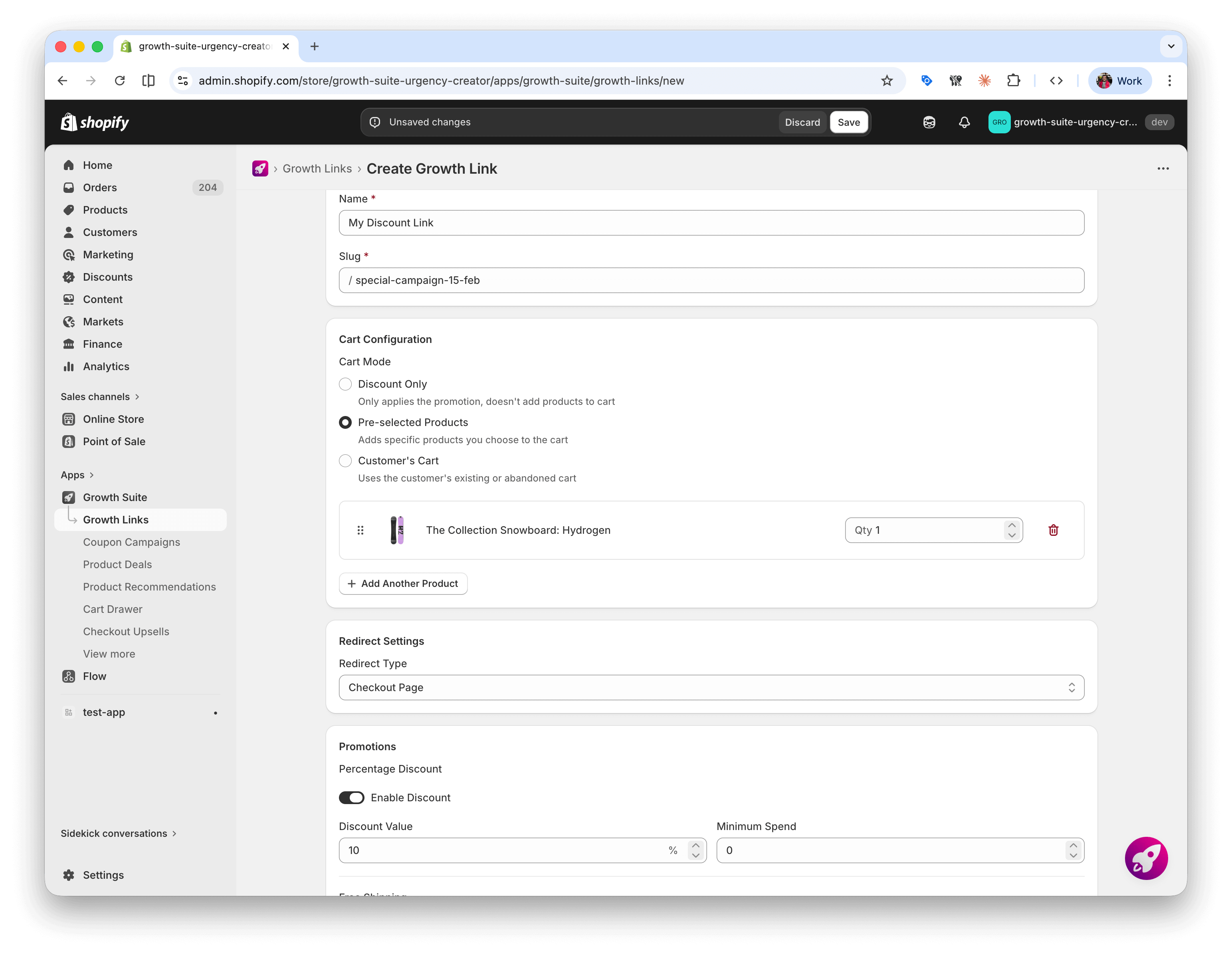
Growth Links are custom, branded URLs that go far beyond applying a code. When someone clicks a Growth Link, the system can apply a discount, add free shipping, include a free gift, pre-fill products in the cart, and send the visitor to any page you choose. All in one click.
Three Cart Modes
Every Growth Link works in one of three modes depending on your goal:
- Discount Only: Applies a promotion while letting the customer shop freely. Great for storewide sales and newsletter campaigns.
- Pre-selected Products: Adds specific products to the cart when someone clicks. Perfect for curated bundles, influencer picks, or "look of the day" promotions.
- Customer's Cart: Works with the customer's existing or abandoned cart. Ideal for cart recovery campaigns via email or SMS.
Stack Multiple Incentives
A basic Shopify discount URL can only apply one code. Growth Links let you stack incentives: a percentage discount plus free shipping plus a free gift—all in a single link. For example: "Get 20% off + free shipping on orders over $50 + a free sample."
| Feature | Shareable Discount Link | Growth Links |
|---|---|---|
| Landing page | Homepage (default) | ✅ Any page you want |
| Pre-fill cart | No | ✅ Add products automatically |
| Free Shipping | Not possible | ✅ Stackable with discount |
| Free Gift | Not possible | ✅ Stackable with discount |
| Redirect control | Manual URL parameter | ✅ Cart, checkout, or any page |
| Analytics | Basic (code usage) | ✅ Views, conversions, revenue, top products |
| Visual confirmation | None | ✅ Customizable popup overlay |
The Growth Links Approach:
Create a branded link in Growth Suite. Choose your discount, add free shipping or a free gift if you want, pick the products to pre-fill, and set where the visitor lands. Share it in your emails, SMS, ads, or with influencers. Track every click, every conversion, every dollar—all from one dashboard.
How Growth Links Solve Every Problem
Let's go back to the six problems with shareable discount links and see how Growth Links handle each one.
Smart Trajectory Control
Remember the homepage problem? Growth Links have three redirect options. Send visitors to the cart page so they see pre-filled items and savings. Send them to the checkout page for the fastest path to purchase. Or send them to any custom page—a product, a collection, a landing page—while the discount stays active in the background.
Full Performance Tracking
With basic Shopify discount URLs, you can see how many times a code was used. That's it. Growth Links show you the full picture: how many people clicked, how many bought, how much revenue each link made, and which products sold through each link. You see a "Top 10 Products" breakdown per link.
Real Use Cases
What You Can Do with Growth Links:
- Influencer campaigns: Create a unique, trackable link for each influencer (e.g., yourstore.com/jane). See exactly how many sales each influencer drives and which products they sell best.
- Flash sales: Build time-limited links for seasonal events. Toggle them on and off instantly. No need to remember to delete codes afterward.
- Cart recovery: Send abandoned cart emails with a Growth Link that re-loads their cart and adds a small discount to bring them back.
- Curated bundles: Pre-fill the cart with 3-4 products, apply a bundle discount, and send customers straight to checkout. One click to buy the whole set.
- Newsletter rewards: Give subscribers a link with discount plus free shipping. They click, they shop, the promotion is already applied.
Bonus: Combine with Trigger Campaigns
Growth Links handle the link-based approach. But Growth Suite also offers Trigger Campaigns with UTM-based audience targeting. You can use regular email links with UTM parameters, and when visitors from that campaign show purchase intent—viewing a product, adding to cart, starting checkout—Growth Suite triggers a unique, time-limited discount just for them. This adds behavior-based timing on top of your campaigns.
Two Approaches, One Platform:
Growth Links give you smart discount links with full control over the landing experience, stacked incentives, and per-link analytics. Trigger Campaigns give you behavior-based unique codes that only appear when a visitor shows real interest. Use them separately or together—both work inside Growth Suite.
Cart Discount Visibility: Stop Losing Sales to Hidden Code Fields
Your customer has a discount code but can't find where to enter it. So they open Honey. Learn why showing discounts in your cart—not at checkout—prevents coupon extension hijacking and converts more shoppers.
Comparing the Approaches: Code vs. Link vs. Growth Links
Let's compare all three approaches to email discount links and SMS discount codes side by side.
| Factor | Code in Email | Shareable Link | Growth Links |
|---|---|---|---|
| Customer friction | ❌ High | ⚠️ Low | ✅ Zero |
| Landing page | ✅ Any | ⚠️ Homepage/redirect | ✅ Cart, checkout, or any page |
| Pre-fill cart | No | No | ✅ Yes—specific products |
| Discount + extras | Discount only | Discount only | ✅ Discount + Free Shipping + Free Gift |
| Per-link analytics | None | Basic | ✅ Views, conversions, revenue, top products |
| Visual confirmation | None | None | ✅ Customizable popup |
| Cart recovery | Manual | Not built-in | ✅ Re-loads abandoned cart |
| Influencer tracking | Per-code | Per-code | ✅ Per-link with full attribution |
| Setup effort | Manual | Manual URL building | ✅ Auto Shopify sync, no coding |
| Best for | Small lists | Quick campaigns | ✅ Serious email, SMS, influencer marketing |
Summary:
Shareable discount links are better than codes-in-email. Growth Links are better than both. You get smart redirects, stacked incentives, pre-filled carts, and real analytics—all from one link. If email, SMS, or influencer marketing is a major revenue channel, the upgrade is worth it.
Implementation Checklist: Discount Links Done Right
If you're going to use shareable discount links, minimize the problems with this checklist.
Discount Link Checklist:
- ✅ Always use redirect parameter (don't dump on homepage)
- ✅ Set usage limits on codes
- ✅ Set expiration dates
- ✅ Segment lists and use different codes for tracking
- ✅ Add UTM parameters to links for attribution
- ✅ Never share shareable discount links publicly
- ✅ Monitor for unexpected redemption spikes
- ✅ Consider upgrading to Growth Links for smart redirects, stacked incentives, and real analytics
When to Upgrade:
If email/SMS drives more than 20% of your revenue, the margin loss from shareable discount links leakage and limited analytics likely exceeds the cost of a proper solution. Growth Links give you smart redirects, stacked promotions, and per-link revenue tracking from day one.
Measuring Discount Link Performance
How do you know if your discount link strategy is working? Track these metrics to find problems early.
Key Metrics to Watch
| Metric | What to Track | Warning Signs |
|---|---|---|
| Redemption rate | Uses / Clicks | ⚠️ Below 30% (friction issue) |
| Usage vs. sent | Uses / Emails sent | ❌ Above 100% (leakage!) |
| AOV with discount | Avg order with code | ⚠️ Below store average |
| New vs. returning | First orders vs. repeat | ⚠️ Skewed toward new (leakage) |
| Source attribution | Campaign → Sale | ❌ "Unknown" sources |
Key Metric:
If your discount code has more uses than emails sent, you have a leakage problem. Every use above your list size is margin you didn't intend to give away. This is the clearest sign your Shopify discount URL is being shared.
Conclusion: From Basic Links to Growth Links
Shareable discount links are an improvement over codes-in-email. They reduce friction, increase CTR, and work great on mobile. For quick campaigns with small lists, they get the job done.
But they create new problems. Homepage landing breaks context. Shared links mean leaked margin. No way to stack free shipping or gifts. And your analytics stop at "how many times was this code used."
Growth Links fix all of this. Send customers to any page. Stack discounts with free shipping and free gifts. Pre-fill carts with products. Track every click, conversion, and dollar per link. And if you want even more control, combine Growth Links with Trigger Campaigns for behavior-based unique codes.
Summary: From Discount Links to Growth Links
- Basic discount links reduce friction — One click beats copy-paste-hope, especially on mobile.
- But they have real limits — Homepage dumps, no stacking, weak analytics, leakage risk.
- Growth Links solve the landing problem — Smart trajectory sends visitors to cart, checkout, or any custom page.
- Growth Links let you stack incentives — Discount plus free shipping plus free gift in one link.
- Growth Links give you real analytics — Views, conversions, revenue, and top products per link.
- Pre-fill carts for one-click buying — Add products automatically for bundles, influencer picks, or recovery campaigns.
- Trigger Campaigns add behavior-based timing — Unique codes that appear when visitors show real purchase intent.
The Bottom Line:
Shareable discount links were a good first step. Growth Links are the next step. Smart redirects, stacked promotions, pre-filled carts, and real per-link analytics—all without writing a single line of code. If you're serious about email, SMS, or influencer marketing, this is how discount links should work.
What if every discount went to the right person?
Growth Suite predicts purchase intent and shows time-limited offers only to visitors who need them.
In This Article
References & Sources
Research and data backing this article
Muhammed Tüfekyapan
Founder of Growth Suite
Muhammed Tüfekyapan is a growth marketing expert and the founder of Growth Suite, an AI-powered Shopify app trusted by over 300 stores across 40+ countries. With a career in data-driven e-commerce optimization that began in 2012, he has established himself as a leading authority in the field.
Version History
Track updates and improvements to this article
Added Growth Links section: smart branded URLs with three cart modes (Discount Only, Pre-selected Products, Customer's Cart), stackable promotions (discount + free shipping + free gift), smart trajectory control, and per-link analytics. Updated comparison tables and implementation checklist.
Initial publication
Stop giving discounts to everyone.
Growth Suite watches each visitor, predicts purchase intent, and makes one real, time-limited offer—only to those who need it.
Try Free for 14 DaysContinue Reading
More articles you might enjoy
Deep Dive: The Ultimate Guide to Percentage Off Discounts

Deep Dive: The Ultimate Guide to Fixed Amount Discounts

Percentage Off vs. Fixed Amount Discounts: Which Converts Better?

Tiered Discounts Strategy: Spend More, Save More

Deep Dive: Buy X Get Y (BOGO) Guide

Free Gift with Purchase (GWP) — The "No-Discount" Strategy
Frequently Asked Questions
Common questions about this topic