10 Shopify Apps to Help You Sell More and Save Time in Q4 2026
 By Muhammed Tüfekyapan

Getting your store ready for Q4 usually starts with the sale. You choose the products, decide on a discount, and work on the ads.
Then the smaller jobs pile up. New photos need to be uploaded. Customers need a way to add a name to a gift. Your designer needs product images. And people are visiting your store, looking around, and leaving without an order.
The apps below help with those everyday problems. Some make shopping easier. Others give your team a few hours back. Here’s where each one fits.
1. Growth Suite

Personal offers
You know the shopper who likes a product but decides to think about it a little longer? They browse a few pages, maybe add something to their cart, and leave.
That’s the kind of visitor Growth Suite is built to help.
It looks at how people shop and finds visitors who show interest but haven’t made up their minds. Then it gives them their own discount code with a clear deadline.
The code applies automatically, so there’s nothing to copy or paste. When the timer ends, the code is deleted. The offer really does end.
Growth Suite also skips visitors it identifies as ready to buy. You can keep the discount focused on people who need a little help deciding, which helps protect your profit.
For Q4, the appeal is pretty clear. You’re working to bring people to your store. This gives interested shoppers a reason to finish their order while they’re there.
There are also tools for bundles, discounts on larger quantities, free gifts, extra items, and offers after checkout. So you have room to try other offers as the season goes on. Growth Suite has the Built for Shopify badge, too.


2. Mini: Custom Fields Personalize

Custom gifts
If you sell personal gifts, getting the order is only part of the job. You also need the right name, photo, message, or other detail from the customer.
Collecting all of that by email gets slow, especially when you have several orders to prepare.
Mini puts those fields on the product page. A customer can type the name for a necklace, upload a photo for a mug, or add a message to a gift box before placing the order. Their answers stay with the order, so your team can find them.
You can show fields based on earlier choices and charge extra for options such as gift wrapping. A gift message box, for example, can appear when someone selects the gift option.
This is a good fit for holiday orders that need personal details. It helps customers get the order right the first time and saves your team from chasing information while gifts are waiting to be made.


3. Shopney

Mobile shopping
Shopney is worth a look if customers come back to your store regularly. It lets you build your own iPhone and Android shopping apps without writing code.
People can browse your products and place orders inside the app. Once they’ve installed it and allowed notifications, you have a direct way to tell them about a new collection or a sale.
You can also send reminders about items left in a cart. Shopney works with many Shopify apps for reviews, loyalty points, and subscriptions, so those parts of your store can be included in the mobile experience.
Think about what happens after Black Friday. Someone bought from you, liked the order, and now has your app on their phone. When your next collection is ready, you have a way to reach them again.
That’s the main reason to use Shopney for Q4: building a connection you can keep using after the holiday sale is over.


4. SSM Sold Counter Social Proof

Real sales activity
SSM makes your store’s real sales activity visible to shoppers.
It can show a label such as “23 sold today,” a best-seller badge, or how many people have recently added a product to their cart. Those numbers come from your Shopify orders and live store traffic.
You choose where the labels appear: on product images, on collection pages, or beside the Add to Cart button. You can match them to your store’s fonts and style, too.
For a first-time visitor, this adds a bit of context. They can see which items other customers are buying while they make their own choice.
If Q4 brings new people to your store, SSM gives them a quick way to spot popular products. It’s especially useful when you already have sales activity that new shoppers can learn from.

More screenshots (5)


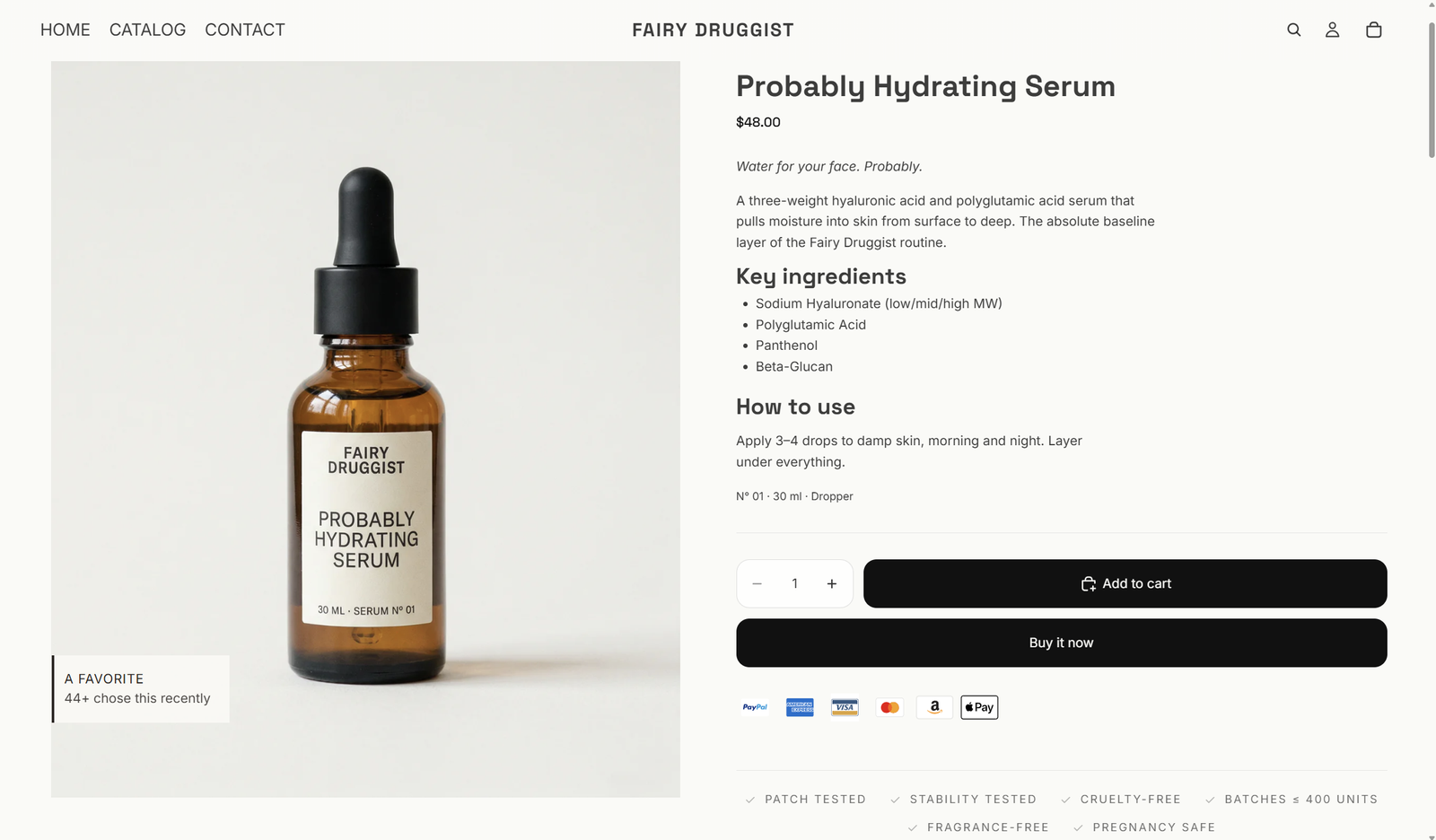
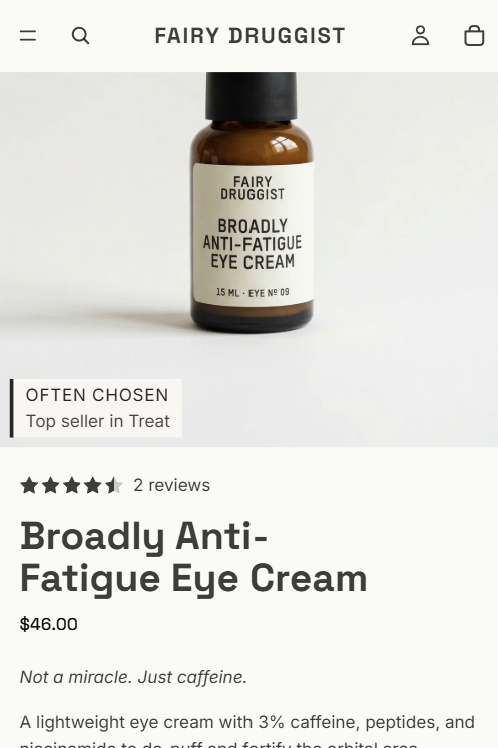
5. Stamp Show Variants on Collection

Easier browsing
Imagine looking for a red sweater and seeing a collection page full of gray and black product photos. Some of those sweaters come in red, but you’d have to open each one to find out.
Stamp helps make those choices easier to see.
It lets different colors, sizes, or styles appear as separate cards on your collection and search pages. Each card can have its own photo, title, and price.
You can also add color buttons, hide sold-out options, and choose the order of the cards. Smart Sort can bring best sellers up and move sold-out items down.
This helps when shoppers arrive with something specific in mind. During holiday shopping, that may be a particular color or style for a gift. Showing it while they browse gives them a better chance of finding it.
6. Giveaway Ninja

Holiday campaigns
A giveaway gives people another reason to get involved with your store during Q4. Giveaway Ninja handles the campaign and its entries.
You can let people earn entries by referring friends, sharing on social media, or making purchases. There are also rules for giving extra entries on certain products, bundles, or order amounts.
You can build a holiday campaign around a prize pack and give extra entries for your new gift collection. You choose how the campaign works and put it on its own page or inside your store.
The app tracks revenue linked to the giveaway and includes a tool to pick winners at random.
It’s a way to give a launch or seasonal campaign more activity around it. People have a reason to join and share, and you can grow your email list along the way.


7. Rubik Variant Images

Clear product photos
Stamp helps shoppers see different product options while they browse. Rubik helps once they open the product page.
When someone chooses the blue version of a product, Rubik shows the photos for that version. You can link several images to each option, so the shopper can see the front, back, and smaller details of the item they’ve chosen.
You can match the images yourself or use AI to help. The app also adds color and image buttons for choosing product options.
This makes a difference if your products come in several colors, patterns, or styles. A shopper buying a gift needs a clear view of the version that will arrive.
For Q4, Rubik is a practical way to make that choice easier. Customers can spend more time looking at the item they want and less time sorting through photos of other versions.


8. CS - Smart Bulk Image Upload

Upload photos in bulk
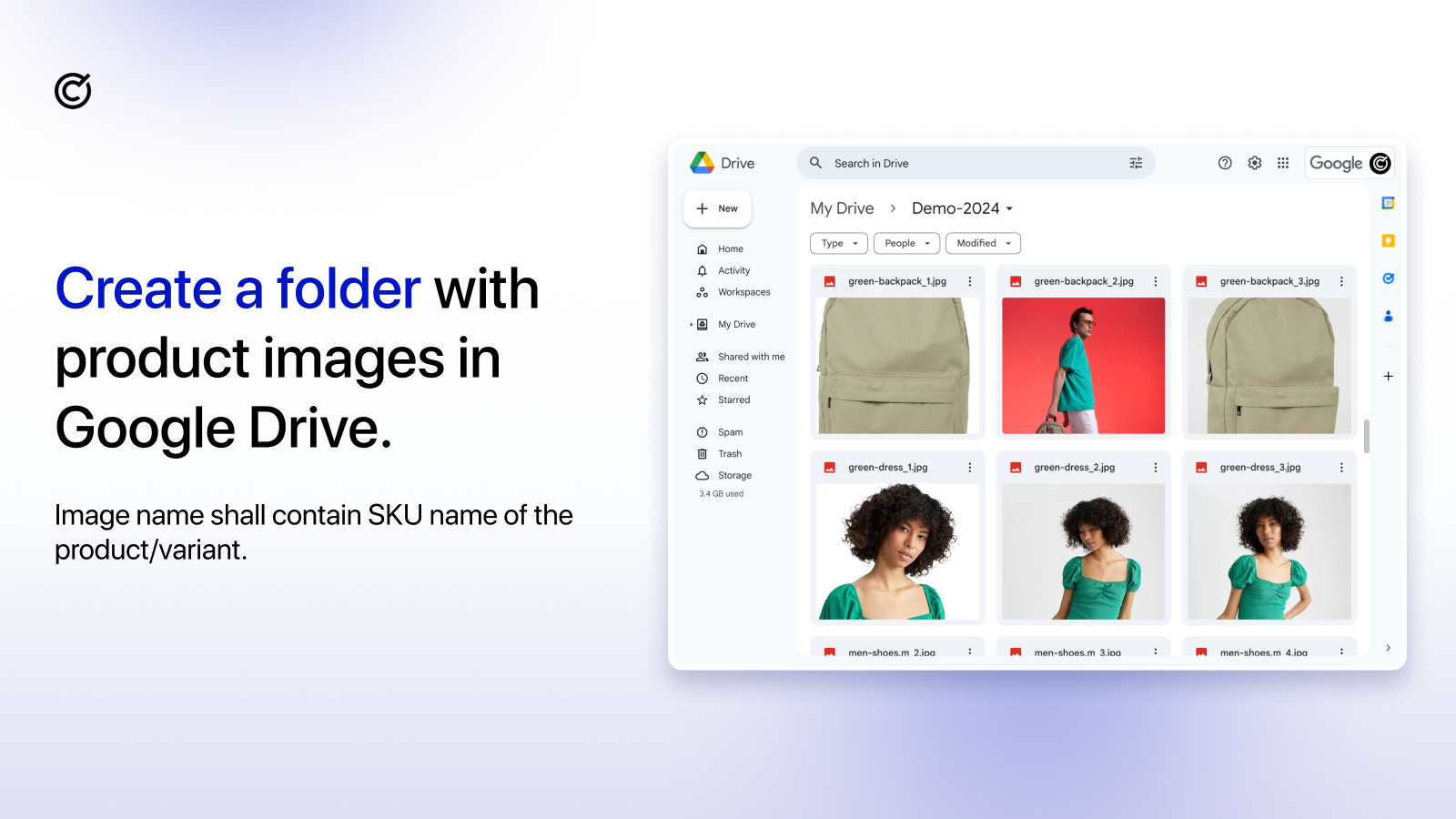
Uploading a folder full of product photos one by one is a slow job. It gets even slower when you have to check which product each photo belongs to.
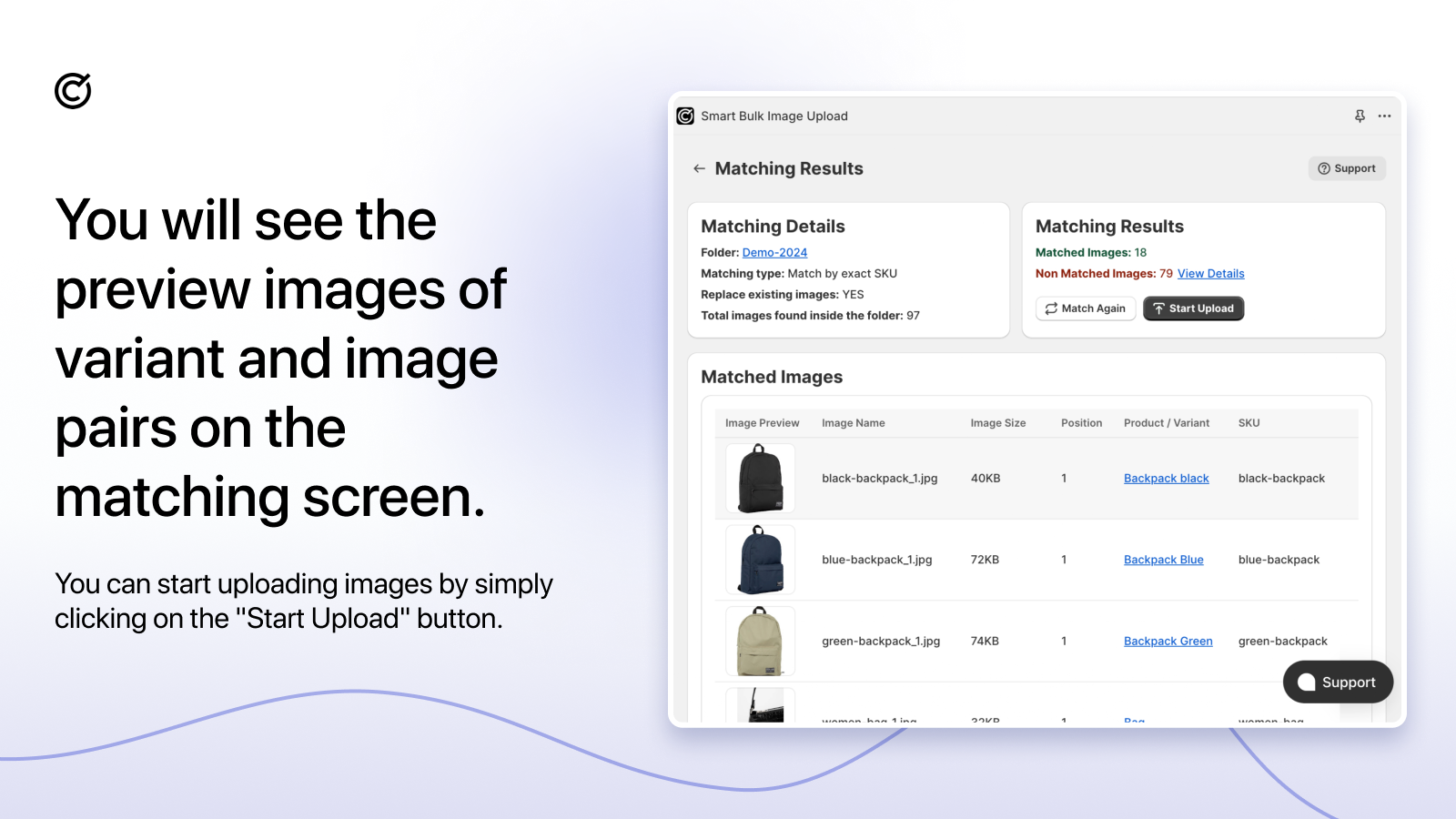
CS - Smart Bulk Image Upload lets you bring in many images at once from Google Drive or Dropbox. It matches them using details such as the product code, also called the SKU, the barcode, or the product name.
You get a preview before the upload starts. That gives you a chance to check the matches and fix file names before the photos are added to your store.
You can add new photos, keep existing ones, or replace them.
If you’re adding a large Q4 collection, this takes a repetitive job off your team’s hands. The benefit is time: you can get the photos ready and move on to the rest of the launch.

9. PieceUp

Puzzle rewards
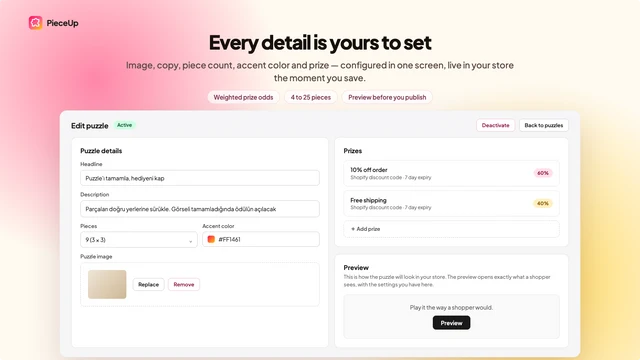
PieceUp is the playful one on this list. It turns a discount popup into a small jigsaw puzzle.
Shoppers put the pieces together and choose a prize. You set the image, difficulty, rewards, and how often someone can play. When they win a discount, the app creates a real Shopify code.
A photo of a holiday gift set would make a natural puzzle image. You can use the game to get people to spend a little time with the product before they claim their reward.
You also get reports showing how many shoppers played, how many finished, and which orders used the reward codes.
If you want to try something different during your Q4 sale, this gives you a simple game to build an offer around. The order reports help you see how people use the discounts they earn.


More screenshots (2)


10. CS - Export Product Images

Download product files
When your designer asks for photos of the full holiday collection, you need a quick way to send them.
CS - Export Product Images lets you download product photos and other store media in bulk. Choose the products you need, filter by collection or brand, and download the files in a ZIP.
You can choose the file names and folder layout, which makes the files easier for someone else to work with. The app also supports product videos, 3D files, and files from Shopify’s Content section.
This is handy when you’re preparing emails, ads, gift guides, or files for another sales channel. You can also use it to keep a copy of your store’s media.
During Q4, a simple request for product photos can happen several times. Having a quick way to get the right files together saves time for you and the people making your campaigns.


More screenshots (2)


Start With the Problem You Already Have
Before your next Q4 campaign, open your store on your phone and try to place an order. Notice where you have to stop, guess, or do extra work. Then think about the jobs taking up your team’s time.
If interested shoppers are leaving without buying, Growth Suite gives you an offer strategy to try with the traffic you already have. If the work is piling up behind the scenes, one of the image tools may be the more useful first step.
Choose the app that helps with your current problem and leave yourself time to set it up and test it before the sale starts.
Frequently Asked Questions
Which app should I start with if shoppers leave without buying?
Growth Suite is a good place to start. It finds interested shoppers and gives them a personal discount with a real deadline. The code applies automatically and is deleted when the offer ends.
Which apps help shoppers choose a color or style?
Stamp shows product options on collection and search pages. Rubik shows the right photos after someone chooses an option on the product page. They help at different points in the shopping journey.
Can customers add names or photos to a gift order?
Mini: Custom Fields Personalize adds those fields to the product page. Customers can enter their details before they buy, and the answers are saved with the order.
Which apps save time with product photos?
CS - Smart Bulk Image Upload brings in photos from Google Drive or Dropbox and lets you check the matches first. CS - Export Product Images downloads your store’s images and other media in bulk.
How does Shopney help after the Q4 sale?
Shopney gives customers a shopping app for your store. You can reach users who allow notifications with new products, offers, and cart reminders after the holiday sale is over.
Ready to Implement These Strategies?
Start applying these insights to your Shopify store with Growth Suite. It takes less than 60 seconds to launch your first campaign.
Muhammed Tüfekyapan
Founder of Growth Suite
Muhammed Tüfekyapan is a growth marketing expert and the founder of Growth Suite, an AI-powered Shopify app trusted by over 300 stores across 40+ countries. With a career in data-driven e-commerce optimization that began in 2012, he has established himself as a leading authority in the field.
In 2015, Muhammed authored the influential book, "Introduction to Growth Hacking," distilling his early insights into actionable strategies for business growth. His hands-on experience includes consulting for over 100 companies across more than 10 sectors, where he consistently helped brands achieve significant improvements in conversion rates and revenue. This deep understanding of the challenges facing Shopify merchants inspired him to found Growth Suite, a solution dedicated to converting hesitant browsers into buyers through personalized, smart offers. Muhammed's work is driven by a passion for empowering entrepreneurs with the data and tools needed to thrive in the competitive world of e-commerce.
More Insights from Our Blog
Continue reading for more expert tips and strategies to grow your Shopify store

60 Days Until Black Friday: What to Lock In This Week and What Can Still Wait
Black Friday is 60 days out. Some decisions get more expensive every week they stay open, and some get smarter. Here is how to tell which is which.

5 Numbers From Your Q3 Data That Should Decide Your Black Friday Offers
Your Black Friday offer is five settings, and Q3 already contains all of them. Read the five numbers that set depth, scope, mechanic, window, and audience.

Your Black Friday AOV Is Decided in September: Build the Upsell Funnel Now
Your Black Friday AOV is set by upsell take rate, and take rate is calibrated in September. The math: trigger rules, product picks, priority.
Explore more
Resources

Shopify Upselling & Cross-Selling
Most Shopify stores leave 10-30% of revenue on the table because they do not upsell or cross-sell effectively. This...

Shopify Conversion Rate: The Complete Resource Hub
Your conversion rate is the most important number in your Shopify store. Learn how to measure it, diagnose problems,...

Shopify Holiday & Seasonal Campaign Strategies
Every holiday has its own shopping psychology. Plan year-round campaigns with the right discount, right timing, and...

Shopify Countdown Timer
Adding a timer takes 5 minutes. Making it convert without destroying trust? That's strategy. The complete guide to...

Shopify Cart Abandonment
70% of Shopify carts are abandoned. Learn why customers leave, how to prevent abandonment in real-time, and recover...

Shopify Discount
Master Shopify discounts without sacrificing your profit margins. Learn strategic discount techniques, timing...