Discount Links
Shopify discount links that apply a discount, free shipping or a gift, fill the cart and send shoppers to cart or checkout. One report...
Install Growth Suite in one click. When onboarding ends, a ready-made campaign is already running. Every widget is a Shopify theme app block that picks up your theme's fonts, and your page speed doesn't change.
Setup
Add Growth Suite from the Shopify App Store. It opens inside your Shopify admin.
A few short steps. No theme files, no code snippets to paste.
A ready-made campaign goes live when onboarding ends. Adjust it whenever you're ready.
Design
Every Growth Suite widget is added with Shopify theme app blocks, so your theme code stays untouched. Widgets pick up your theme's fonts, and you can change colors, text and position, or add your own CSS.

Price tiers sit right above Add to Cart, in your store's style.

Extra items customers can tick before they add to cart.

Reward goals and product suggestions in a side cart.
No-code editor
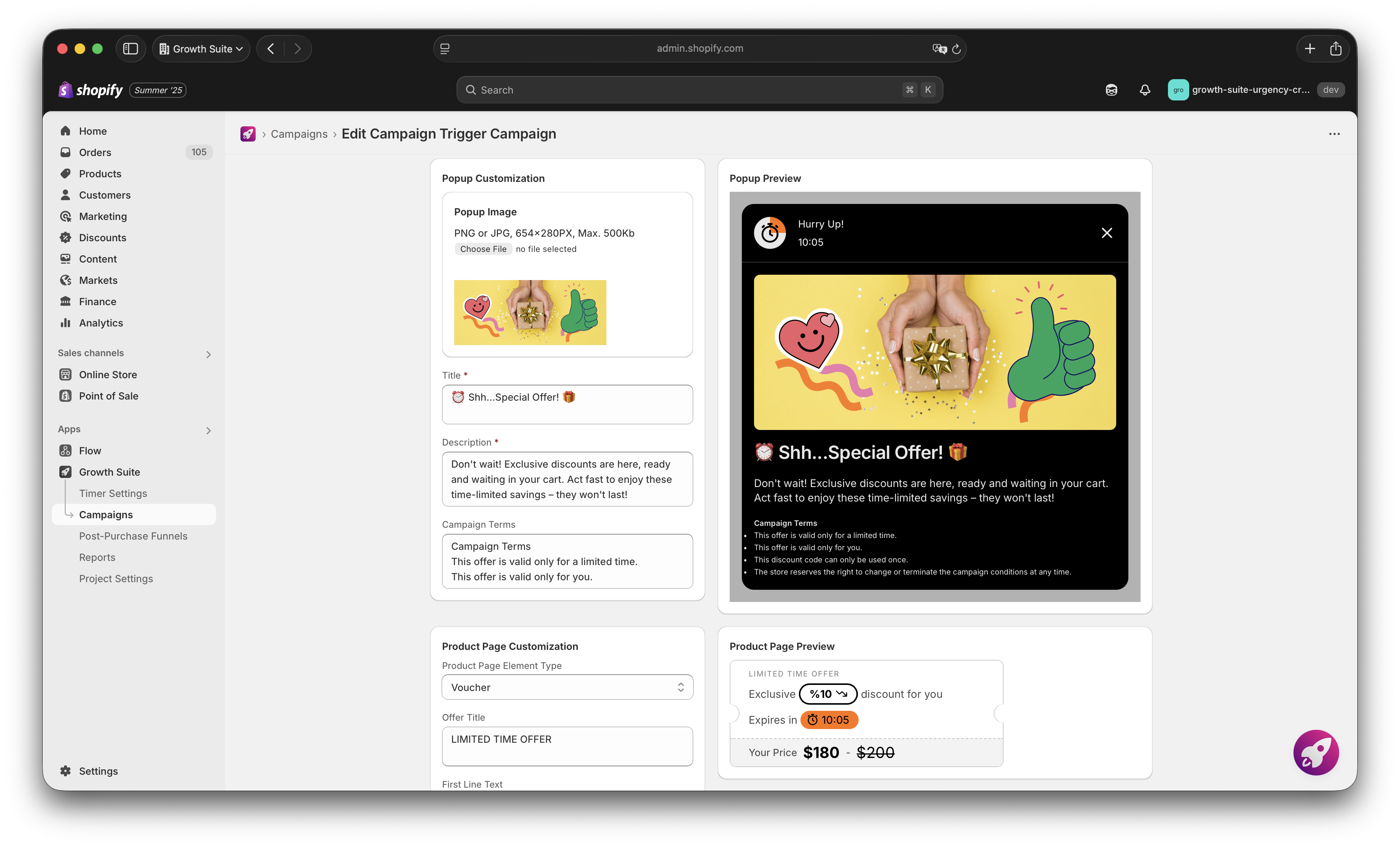
Growth Suite's editor lives inside Shopify admin. Edit a field on the left and see the change in the preview on the right.
Popup
Image, title, description and campaign terms.
Product page element
Element type, offer title and every line of text.
Look
Colors, position and your own CSS. Fonts follow your theme.
Live preview
See each change before a single shopper does.
Languages
Every widget supports multiple languages: campaigns, cart incentives, volume discounts, add-ons, bundles, post-purchase offers, deal sets and slides. AI can write the widget copy for you, and you can translate it all in one go.
Performance
Speed matters for conversion, so it can't be the price you pay for a conversion app.
Lighthouse
No impact on performance
Lighthouse shows no change in page performance with Growth Suite installed.
Built for Shopify
Checked by Shopify
Shopify only gives the Built for Shopify badge after making sure an app doesn't slow stores down. Growth Suite has it.
★★★★★
Rated 4.9 out of 5 on the Shopify App Store
Built for Shopify. Installed in one click, running when onboarding ends.
No. Install Growth Suite from the Shopify App Store and finish onboarding. There are no theme files to edit and no code snippets to paste.
Yes. A ready-made campaign goes live when onboarding ends. Adjust it whenever you're ready.
Yes. Growth Suite works with all Shopify themes, and its widgets pick up your theme's fonts.
No. Every widget is added with Shopify theme app blocks, so your theme files stay as they are.
Blocks an app adds to your store through Shopify's theme editor, so the app never has to edit your theme files.
No. Lighthouse shows no impact on page performance, and Growth Suite has Built for Shopify status, which Shopify only gives after checking an app's effect on store speed.
Yes. Growth Suite has the Built for Shopify badge. Before giving it, Shopify checks, among other things, that an app doesn't slow stores down.
Yes. They pick up your theme's fonts, and you can change colors, text and position.
Yes. Add your own CSS in the editor, on top of the color, text and position settings.
Yes. Every widget supports multiple languages: campaigns, cart incentives, volume discounts, add-ons, bundles, post-purchase offers, deal sets and slides.
Translate all of it in one go from the editor. AI can also write the widget copy for you.
In Growth Suite's editor inside Shopify admin, with a live preview next to every change.
Growth Suite for Shopify
Start turning browsing visitors into customers with smart, well-timed offers. It takes less than 60 seconds to launch your first campaign.
14-day free trial · No credit card · Cancel anytime